For Indian practice
The plan is compiled, not guessed.
Describe what you're building in plain language. Karna writes it as a precise plan, compiles that plan into a real drawing, and checks it against the National Building Code and the bye-laws — with the clause cited for every result. The AI never draws the wall; it states the room, and the geometry is derived. To the millimetre.
Free Beta for macOS, Windows & Linux · licence issued on request.
The difference
Most AI plans are pictures. This is a drawing you can build on.
Ask a typical AI for a plan and you get an image. It can look convincing, but there is no dimension you can rely on, nothing you can measure, and nothing that holds up to a building-code check — so it looks like a shortcut and becomes a redraw.
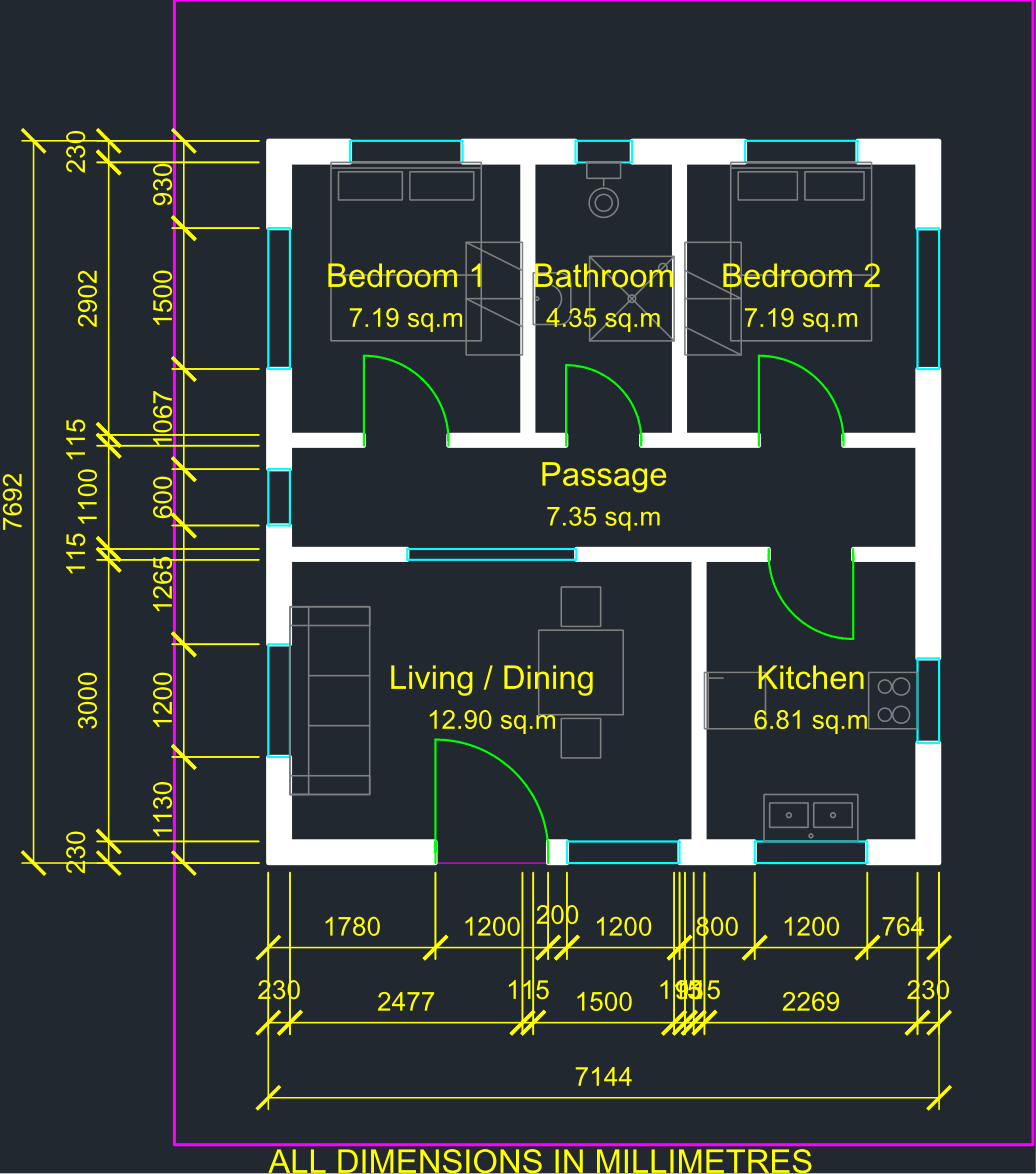
Karna is built the other way round. The AI writes the plan as a structured document, and a deterministic engine compiles that document into an exact drawing. What you get is measured, internally consistent, and checkable against the code — a plan you can develop and build from, not a picture of one.
How it works
One brief. Five deterministic steps. A drawing you can measure.
You write the brief
Describe the building the way you'd brief a junior: the plot, the road side, the setbacks, the rooms and their sizes. Plain language.
The AI writes the plan as code
Working from your brief, the AI authors a declarative document — not a drawing. A room states its interior size; the walls grow outward from it.
The engine compiles it
A deterministic compiler turns that document into geometry and into a drawing — in integer millimetres. A mistake doesn't crash it: the compile succeeds and reports the exact field and line to fix, with a hint on how.
Three reviewers check it
Independent agents audit the result — one over geometry, one over dimensions, one over code compliance. One re-derives the compliance numbers and checks the checker.
You review and export
Review the drawing in the app and export it when you're ready. What you review and what you export come from the same document, so they cannot disagree.
Precision & determinism
Exact by construction, not by luck.
The model never draws geometry
It writes a document that states intent — room sizes, positions, openings. Every wall, corner, and dimension is derived by the compiler. No length is ever invented by the AI, so none can be wrong by 3 mm and stay hidden.
A float is refused, not rounded
A room written in metres — [3.6, 4.2] — is rejected outright, not quietly stored as 3 mm. A plan is a document someone will build from; the engine refuses the ambiguity rather than guessing at it.
What you review is what you hand off
The drawing you review on screen and the one you export are the same document, rendered once. There is no second output that could quietly drift from what you approved.
Compliance
Checked against the code — with the clause cited.
Setbacks, FAR, ground coverage, and room minima are computed directly from your plan against a versioned ruleset built on the National Building Code and the Model Building Bye-Laws, and configurable to local development-control rules across India. You don't get a verdict — you get a result with its source, so you can check the reasoning against the actual bye-law.
Editable geometry, not a flattened picture
Export a proper CAD drawing — the exact geometry you approved, in the units you authored it, ready to open and develop in the software your practice already uses. What you signed off is what your colleague opens, to the millimetre.
A desktop app, not a browser tab
Karna runs on your own machine. The drawing engine and the compliance checks work locally, and your plans are files on your disk — yours to keep, edit, and version. There's no AI account to set up and no keys to manage; you activate Karna with a licence and go.
Questions
What a careful professional asks first.
How accurate are the dimensions?
Exact, by construction. The drawing is compiled from a document in integer millimetres; the AI never draws geometry, it states room sizes and the engine derives the rest. There is no floating-point rounding and no length invented by the AI. A plan that tries to use metres — a float — is rejected rather than silently converted.
Does this mean my drawing is approved or legally compliant?
No — and any tool that claims that is misleading you. Karna checks your plan against a versioned ruleset built on the NBC and Model Building Bye-Laws and shows the results with the clause cited for each one. That is a rigorous, auditable check. Approval is granted by a sanctioning authority, not by software. Karna makes the compliance work faster and traceable; it does not replace the authority or your professional judgement.
Can I export and keep working in my own software?
Yes. Karna exports a real, editable CAD drawing — the exact geometry you approved, in the units you authored — so you can open it in the software your practice already uses and carry on. It is a drawing, not a flattened image, and it comes from the same document you reviewed, so it can't drift from what you signed off.
Does it replace me as the architect?
No. Karna drafts and checks; it does not stamp, submit, or take professional responsibility. It removes the repetitive dimensional and bye-law work so you spend your time on judgement — the plan is editable text you stay in control of at every step.
Which codes and regions does it cover?
The compliance engine is built on the National Building Code and the Model Building Bye-Laws, and is designed to be configured to local development-control rules across India's states and regions. The exact rulesets shipped are versioned and cited in-app, so you always see which clause a result comes from.
Where does my work live?
Karna is a desktop app: the drawing engine and the compliance checks run on your machine, and your plans are files on your own disk — yours to keep, edit, and version. Generating a plan sends your brief to Karna's AI service to produce it; the drawings and the checks themselves stay local. There's no separate AI account or key for you to manage.
What do I need to run it, and what does it cost?
A Windows desktop and a Karna licence — that's it (macOS and Linux builds return next month). The AI runs through Karna, so there's no separate AI subscription or key to set up. Karna is in Beta right now: it's free to download, and we issue Beta licences on request. Pricing for the full release is arranged directly with us — sign up and we'll be in touch.
Download · Beta
Try the Beta today.
Karna is in Beta. The app is free to download and licence-gated — email us and we'll issue you a Beta licence key so you can run it.
Windows is first out of the Beta. macOS and Linux follow next month — tell us where to send them.
Beta · not yet code-signed — if SmartScreen warns, choose More info → Run anyway.
Not ready for a Beta? Get notified when the full release is out, and follow the project's progress in the meantime.